


Texting Instructions
How to Opt in to Text Messaging
- Click on the Sign Up for Our Text Notifications gray button on the Texting page or at the top right of this page.
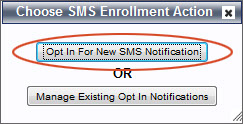 If you are Opting In for the first time, select the
Opt In for New SMS Notification.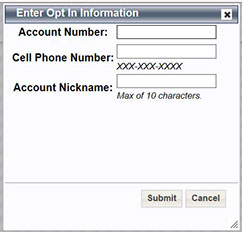 From here you will be asked to enter a valid account number (no hyphens), cell phone number and an account alias or nick name. (Just make up a name such as "HOME" or "CVECTEXT.") You must enter all of these fields to be successfully “Opted-In” to the service.
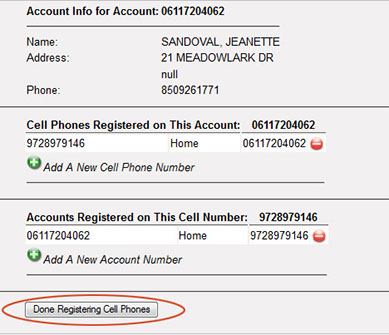
An alias or nick name allows a user to enroll for outage reporting or outage notifications on multiple accounts tied to the same cell phone number. But it identifies those accounts with a name such as WELL, BARN, LAKE, etc. The user is then able to report an outage by texting #Outage BARN to indicate the location for which they would like to report the outage. If the user has multiple accounts and forgets to enter the alias, the system will provide them the list of Alias names to choose from in the reply.- Online the system will show you a summary of the account(s) which are tied to the cell phone number provided and allow you to add new cell phones or account numbers to each of the accounts.
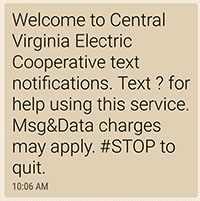 Once you have successfully enrolled, you will receive a text message on the registered phone, acknowledging enrollment.
- To report an outage, use the cell phone entered above and text the words #OUT to 85700. Within a few seconds, you should receive a response stating: “We have entered outage ticket number XXXXXXXX. Power has been reported out at (service address)” If this outage were part of a device outage, more information would be provided in the message.
- Once the outage is restored, you should also receive a notification that the power was restored.

How to Manage Text Notifications
- Click on the Sign Up for Our Text Notifications gray button on the Texting page or at the top right of this page.
- Click on the Enroll in/Manage Text Messaging Notification Option from the utility website.
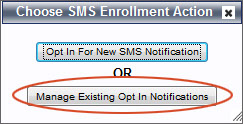 This will take you to the Opt In page for CVEC. Click on the Manage Existing Opt In Notifications button.
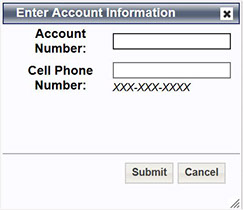 The system will ask you to enter your account number (no hyphens) and cell phone number for which you are currently enrolled for text notifications.
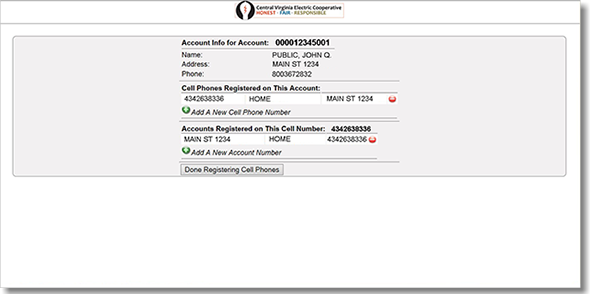
 - Once logged in, you will see a page similar to the one below and will be allowed to add new cell numbers to the account, or add new accounts to the cell phone number. Once you complete your update, click on Done Registering Cell Phones.

Texting Instructions
Sign up for our Text Notifications
HOME | REPORT AN OUTAGE | PAY MY BILL | CONTACT CVEC
Phone: 434.263.8336 | Toll free: 800.367.2832 | Fax: 434.263.8339
Corporate Headquarters:
800 Cooperative Way
Arrington, VA 22922
Payments:
Dept. 1340 | PO Box 2153
Birmingham, AL 35287-1340
Correspondence:
P. O. Box 247
Lovingston, VA 22949